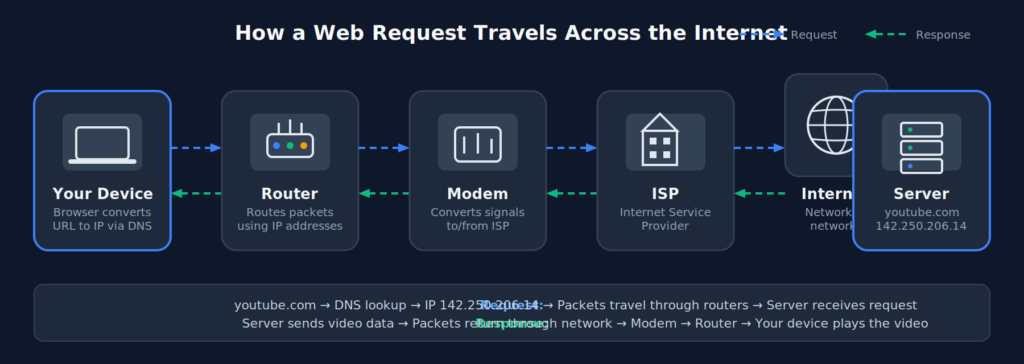
Let’s say there is a video or webpage stored in the hard disk of a server somewhere in the Google datacenter. When we request for this resource, what happens? How does the resource available on our system? Every device connected to the internet has an IP(Internet Protocol) Address. It is four sets of numbers separated by dots, for example: ‘142.250.206.14’. When we request for a youtube video we type in youtube.com on the browser. The browser looks for this information locally, if it is not found, it queries the DNS resolver which is part of the DNS (Domain Name System) .
First the DNS resolver queries root server which returns the address of TLD (Top Level Domain) nameserver which in this case is the “.com”. Then the query is sent to the relevant DNS nameserver (for .com) which looks up the IP address for youtube.com and returns the IP. Let’s say this is 142.250.206.14. Our request goes out to the internet which is a set of routers connected together using wires. Each router adds a layer of information to identify itself while forwarding to the next router. When the request finally reaches the server, it will be able to add the data and send it back. The data packet will be able to find it’s way back to the requesting computer because of all the information added by the routers. See DNS for Developers for a more in-depth explanation of DNS.
Data
The data is not sent or received in one big chunk. For example a video file. It is broken down into something known as packets. Each packet will have a serial number along with other information to indicate the order of the packet. Once the data is received it will be assembled using the order of these serial numbers. All the packets need not go through the same path. The best available path will be decided by the routers at that particular time. If any packets are missing, then a request is made for those packets. There are specific rules of formatting the data packets. These are called protocols. You might have heard about TCP/IP, UDP etc. These are nothing but rules for formatting the data packets so that everyone on the internet can understand and use it.
How can computers talk to each other
We can connect 2 computers together via an ethernet cable. But if we have 10 computers, it would not be practical to connect every one to each other. For this we can use a switch. Once all the computers are connected to the switch, it will help to transfer messages and data from one computer to another computer. There is a limitation to how many computers can be connected to a switch. When we have a bigger network, we need to use a router. Switches work with the MAC addresses of the devices. However routers work with the IP Addresses which are unique across all devices connected to the internet.
Router
A router can transfer packets of information to a destination IP Address. It will also allow us to share the internet connection with multiple computers. A router can form a network of connected devices and also connect different networks. In order to connect to the internet we need a modem
Modem
A modem connects a device or network to the Internet. The internet consists of large optical cables which run across the oceans and various parts of the world. Internet is a network of networks. There are various ISPs (Internet Service Providers) who connect to this and deliver to home and businesses. The modem receives the signals from these ISPs and convert them to digital format which the devices can consume.
So, when you type youtube.com, here’s the full journey. Browser converts this domain name to IP Address using the DNS. The request is sent across through the router over to the modem. Modern home devices combine router and modem together. The router has the task of delivering the data to the destination IP Address. However, this is not a straight transfer. It will forward the request to other connected routers. Once the request reaches the destination IP, the data is processed and the response(In this case the video) is returned back through the network of routers, and finally the modem receives the response and delivers to the device for playback.