What is DNS and why do we need it?
When we want a resource from a server for example a webpage or a video on youtube, we need to specify the address of the server. Every device connected to the internet has an IP Address. It is hard to remember every IP Address that we want to visit. So, we enter a human friendly name e.g youtube.com which is the domain name. How does this get translated to the IP Address? This is where the DNS or the Domain Name System comes in. When we enter this domain name the browser first looks locally e.g the hosts file. If it is not found, it queries the DNS which returns the IP Address.
How DNS Resolution Works
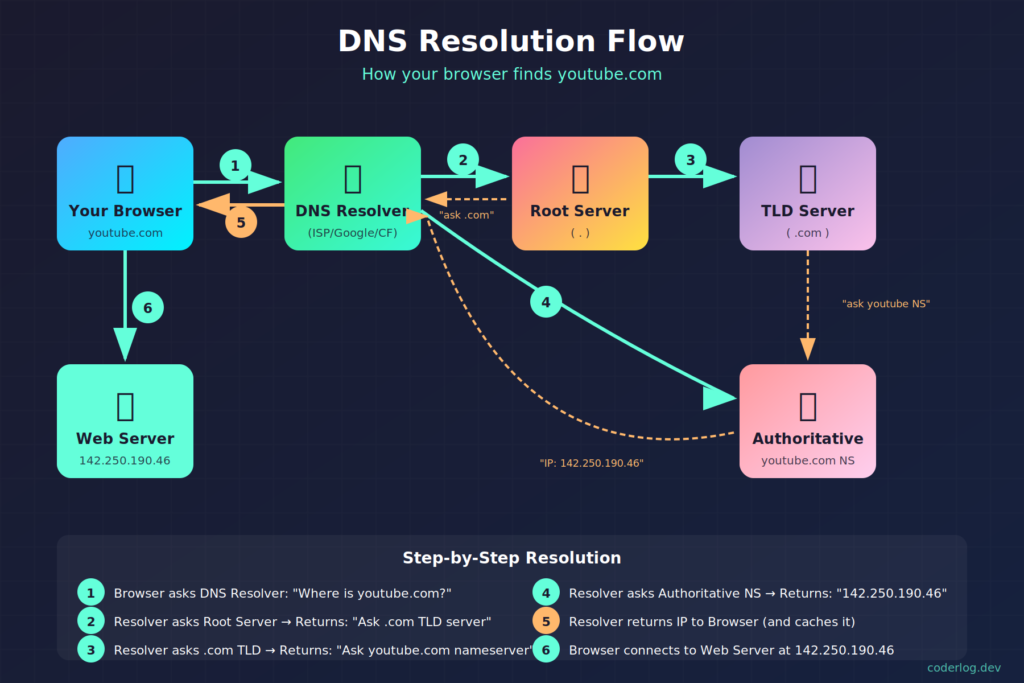
DNS is not a single server which has the IP Addresses of all servers on the internet. Instead it is a network of servers distributed across the internet. After the user enters the domain name, the Browser makes a call to the DNS Resolver. The DNS Resolver then makes multiple recursive calls to complete the task. If the domain youtube.com is entered, first a call is made to the root name server which returns the address of the TLD (Top Level Domain) e.g. “.com”. Then TLD is queried which return the address of name server where “youtube.com” can be found. When this address is queried it returns where “youtube.com” is present which is the actual IP address of the server. The final name server which returns the actual IP Address is also called Authoritative Name Server.
Hosts & Subdomains
The domain owner can create multiple hosts for different services or servers within the domain. For e.g. www.example.com for the website, ftp.example.com for ftp, files.example.com for sharing files etc. The individual host only need to be unique within the domain.
The domain owner can also create subdomains under the main domain e.g. blog.example.com or app.example.com. This also only need to be unique within the domain.
Fully Qualified Domain Name or FQDN means the full domain name e.g. www.example.com. Also notice the dot at the end which indicates the root name server.
DNS Caching & TTL
In order to optimize performance the name servers keep the IP Addresses in cache. So, If we change the IP Address of a website, it will still return the old IP Address because it has been cached. How long this stays in cache is usually determined by the TTL(Time To Live). I say “usually” because not all servers need to respect the TTL. Some name servers can cache it for 24 hours. So, we need to wait for the cache to be flushed, then the new IP Address will take effect.
Common Record Types
There are many different record types such as SOA, A, CNAME, MX, NS etc. However the most important of these is the A record which maps our domain name to the IP Address. For example, when setting up this blog, I added an A record pointing coderlog.dev to my hosting server’s IP address. AAAA is similar to A record but indicates an ipv6 address. The CNAME record or the Canonical Name is an alias pointing to a domain. The CNAME should never point directly to an IP Address. For example, we can have a subdomain blog.example.com which can point to the example.com.
Use MX records to indicate the mail exchanges that are used in the server. This is not a mapping record, just the server address is mentioned like mail.domainname.com. TXT records are strings of text which was originally used to store human readable notes. Nowadays, it is used more for domain verification and email spam prevention.
That’s it for this quick introduction to DNS. Let me know if anything is not clear or want me to dive deeper into in the comments section below.